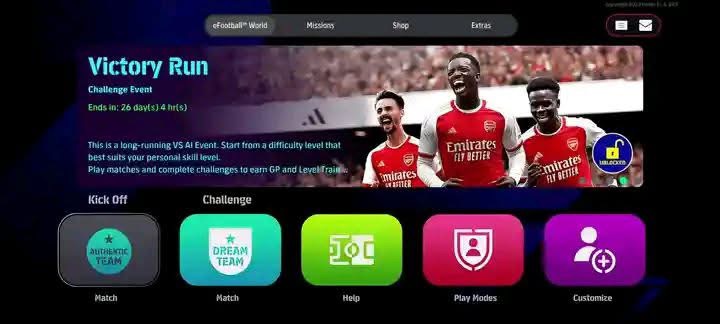
Looking for eFootball 2026 Mobile Offline for Android? This community-made mobile football package comes with separate APK options for different Android versions, an OBB file, and a DATA package.
The supplied files include an APK for Android 13+, another APK option for Android 11/12/13, the FIFA 16 Mobile OBB package, and DATA from the supplied eFootball 2024 by Roberfl and DK7 package. (MediaFire)
Important: This is a community-made mobile football modification and is not an official Konami eFootball 2026 Android release.
⚽ eFootball 2026 Mobile Offline Features
According to the supplied files, this package includes:
- ⚽ Offline mobile football gameplay
- 📱 Android 11/12/13 APK option
- 📱 Android 13+ APK option
- 📦 Separate OBB file
- 💾 Separate DATA package
- 🎮 FIFA 16 Mobile-based file structure
- 🔧 ZArchiver installation
- 🔐 Password-protected archive support
📦 File Information
📱 APK — Android 13+
File: DFL APK ANDROID +13.7z
Size: 43.68 MB
Format: 7Z Archive (MediaFire)
📱 APK — Android 11/12/13
File: DFL apk.zip
Size: 44.59 MB
Format: ZIP Archive (MediaFire)
MediaFire’s page for the Android 11/12/13 archive currently reports 0/30 VirusTotal engines detecting the file. This is only a scan result at the time checked and is not a guarantee of safety. (MediaFire)
📂 OBB
File: OBB FIFA 16 MOBILE.zip
Size: 1.31 GB
Format: ZIP Archive (MediaFire)
💾 DATA
File: DATA EFOOTBALL 2024 BY ROBERFL AND DK7.zip
Size: 1.28 GB
Format: ZIP Archive (MediaFire)
🔐 Password
Password:
BY ROBERFL AND DK7
💾 Approximate Download Size
Using one APK option, the package is approximately 2.62–2.63 GB before extraction.
You should have considerably more free storage available because ZArchiver needs additional space to extract the OBB and DATA archives.
📱 How to Install eFootball 2026 Mobile Offline
Step 1 — Choose the Correct APK
There are two APK options.
Android 13 and newer:
DFL APK ANDROID +13.7z
Android 11/12/13 option:
DFL apk.zip
Choose the APK option that matches your Android version and the package requirements.
Do not install both APK versions at the same time.
Step 2 — Download the OBB and DATA
Download:
- APK
- OBB
- DATA
The OBB and DATA files are required for the complete setup described in this article.
Step 3 — Open ZArchiver
Open ZArchiver and go to:
Internal Storage/Download
Locate your downloaded archives.
Step 4 — Extract the APK
For the Android 13+ package, open:
DFL APK ANDROID +13.7z
For the other Android option, open:
DFL apk.zip
Extract the archive.
If the extracted package contains an APK, install it but don’t launch the game yet.
Step 5 — Extract the OBB
Find:
OBB FIFA 16 MOBILE.zip
Tap it and select Extract here.
After extraction, check whether it contains an Android/obb structure or a game package folder.
If the package contains a folder beginning with the game’s package name, place it inside:
Internal Storage/Android/obb/
Keep the folder structure exactly as supplied.
Step 6 — Extract the DATA
Find:
DATA EFOOTBALL 2024 BY ROBERFL AND DK7.zip
Tap it → Extract here.
When extraction asks for a password, enter:
BY ROBERFL AND DK7
Make sure you type the password exactly, including the spaces and capital letters.
Step 7 — Place the DATA
Check the extracted folder structure.
If it contains an Android/data folder or a game package folder, copy it to the corresponding Android DATA location.
For example:
Internal Storage/Android/data/
Do not rename the package folder.
Step 8 — Check the OBB and DATA
Before opening the game, verify that:
- The APK has been installed.
- The OBB is in the correct location.
- The DATA is in the correct location.
- The required folders have not been accidentally placed inside an extra nested folder.
Step 9 — Launch the Game
Now open the installed game.
The first launch may take longer while the game loads its OBB and DATA files.
⚠️ Android Storage Note
Newer Android versions can restrict access to Android/data and Android/obb.
If ZArchiver asks for folder access, grant the required Android permission and select the appropriate folder.
If your Android version prevents direct access, the exact installation process may differ depending on your device and Android build.
📢 Download Notice
An advertisement or pop-up may appear when you click a download button. Simply close or cancel the advertisement and continue to your intended download destination.
MediaFire explicitly displays an advertiser-message notice on the download process for these files. (MediaFire)
⚙️ Performance Tips
For better offline gameplay:
- Close unnecessary background applications.
- Keep enough free internal storage.
- Avoid recording the screen if your phone struggles.
- Reduce graphics settings if you experience lag.
- Restart the game after installing the OBB/DATA.
- Don’t delete the original archives until you’ve confirmed that the installation works.
❓ Frequently Asked Questions
Is this the official eFootball 2026 mobile game?
No. This is a community-made mobile modification/package and should not be confused with an official Konami release.
Which APK should I download?
Use the Android 13+ APK for devices running Android 13 or newer. The other APK is labeled for Android 11/12/13. (MediaFire)
What is the password?
The supplied DATA password is:
BY ROBERFL AND DK7
How large is the OBB?
The OBB archive is 1.31 GB. (MediaFire)
How large is the DATA?
The DATA archive is 1.28 GB. (MediaFire)
Can I play it offline?
The package is presented as an offline mobile football setup, but exact offline functionality can depend on the supplied mod files and installation.
📢 Follow for More
For more PPSSPP, Android football games, offline mobile games, updates, mods and installation tutorials, follow Bulk Gaming’s for future releases.
⚠️ Disclaimer
This is a community-made mobile football modification and is not affiliated with or endorsed by Konami. The package uses files labeled with FIFA 16 and eFootball 2024 in its supplied filenames, so the eFootball 2026 title refers to the community package/update being shared rather than an official 2026 release. File contents and compatibility can vary. Download and install files at your own discretion.
💾 Make sure you have enough free storage before extraction
