
Running PC and console-quality games on Android has always been a dream for many mobile gamers. With the right emulator, you can turn your smartphone into a portable gaming machine capable of handling titles that normally require a Windows PC. That’s exactly what Winlator APK brings to the table.
Winlator is one of the most powerful tools for Android that allows you to run Windows applications and PC games directly on your phone or tablet. It uses a combination of Wine + Box86/Box64 + DXVK to make Windows programs compatible with Android systems. In simpler words, Winlator lets you enjoy PC-level gaming on the go.
This article covers everything you need to know about Winlator APK:
- What it is and how it works
- Why gamers use it
- Key features
- Required files for installation
- Step-by-step installation guide
- Supported games and apps
- Performance review
- Tips for smoother gameplay
- FAQs
- Final thoughts
What is Winlator APK?
Winlator APK is an Android emulator app designed to run Windows-based software and games. Unlike regular emulators that simulate a console (like PPSSPP or Dolphin), Winlator creates a Windows-like environment on your Android device.
With it, you can:
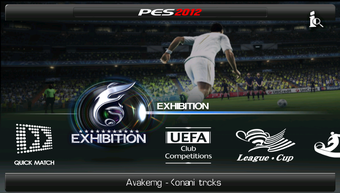
- Play PC games like GTA V, Fallout, Skyrim, PES, FIFA, and more.
- Run Windows apps such as Notepad++, Photoshop (light versions), and some productivity tools.
- Experience a portable PC emulator without needing a high-end laptop.
Winlator doesn’t need rooting, making it safe and accessible for any Android user.
Why Choose Winlator?
There are already several Windows-on-Android solutions, but Winlator is different because:
- 🚀 Free and Open Source: Unlike some paid apps, Winlator is completely free.
- 🎮 Game-Friendly: Optimized for 3D PC games that usually don’t run on Android.
- 📱 User-Friendly Interface: Simple setup and easier than most Wine/Box86 builds.
- 🔧 Customizable: You can tweak controls, resolution, and performance settings.
- 🌐 Regular Updates: Developers push new patches to improve compatibility.
- 🛠 Wide Support: Works on ARM and x86 Android devices.
Features of Winlator APK
Here’s what makes Winlator stand out:
- ✅ Run PC Games on Android: From older classics to modern 3D titles.
- ✅ Wine + Box86/Box64 Integration: Ensures maximum compatibility.
- ✅ DirectX Support via DXVK: Brings smoother graphics and less lag.
- ✅ Multiple Profiles: Create different settings for different games.
- ✅ Customizable Controls: Map keyboard and mouse inputs to touchscreen.
- ✅ Audio & Graphics Enhancements: Enjoy immersive gameplay with sound support.
- ✅ No Root Required: Works on both rooted and non-rooted phones.
- ✅ Supports External Controllers: Use PS, Xbox, or generic Bluetooth pads.
- ✅ Multitasking: Run apps in windowed mode like a real PC.
- ✅ Offline Use: Works without internet once installed.
Required Files
To use Winlator APK properly, you’ll need:
- Winlator APK file → The main application.
- Winlator Data/OBB files → Contains environment, system files, and compatibility libraries.
- ZArchiver or RAR App → To extract compressed files.
- Games or Apps → PC game setup files you want to run (like GTA, PES, FIFA).
Installation Guide (Step by Step)
Follow these steps to set up Winlator on Android:
- Download Winlator APK and OBB.
- Install ZArchiver from Google Play.
- Use ZArchiver to extract the OBB/Data file.
- Move the OBB folder to:
Android > OBB - Install the Winlator APK (enable Unknown Sources in settings).
- Open the app → It will create a container (like a virtual PC).
- Copy your Windows game setup/exe files into the container.
- Configure the profile (RAM, CPU, graphics, and controls).
- Launch the game/app directly on your Android screen.
Supported Games on Winlator
Winlator supports a wide range of PC titles. Some tested and confirmed to run include:
- 🎮 GTA Series → GTA San Andreas, GTA V (with tweaks).
- 🎮 FIFA & PES PC versions.
- 🎮 Counter-Strike 1.6, CS:GO (light build).
- 🎮 Elder Scrolls: Skyrim.
- 🎮 Resident Evil 4, 5, 6 PC editions.
- 🎮 League of Legends (low settings).
- 🎮 Age of Empires II/III.
- 🎮 Indie titles and classic games.
Not all games run perfectly, but Winlator keeps improving compatibility.
Performance Review
How well does Winlator actually run?
- Graphics: With DXVK integration, 3D games run smoother than older emulators.
- Speed: On 4GB RAM+ devices, many games reach playable FPS (30–60).
- Controls: On-screen mapping works, but controllers improve gameplay.
- Battery: Heavy games consume a lot of power, so charging is recommended.
- Stability: Some newer games may crash, but classic titles run flawlessly.
Tips for Better Performance
- Use a phone with Snapdragon 800 series or higher.
- At least 4GB RAM recommended (6GB+ for heavy games).
- Set resolution to 720p for smoother FPS.
- Enable frame skipping if game lags.
- Use an external controller for better gameplay.
- Always keep the latest Winlator version installed.
Comparison: Winlator vs Other Apps
| Feature | Winlator | ExaGear | GameLoop | WineDroid |
|---|---|---|---|---|
| Runs PC Games | ✅ Yes | ✅ Yes | ❌ No | ✅ Yes |
| Free & Open Source | ✅ Yes | ❌ Paid | ✅ Free | ✅ Free |
| DirectX Support | ✅ Yes | Partial | ❌ No | Partial |
| Controller Support | ✅ Yes | ✅ Yes | ✅ Yes | Limited |
| Updates Available | ✅ Active | ❌ Stopped | ✅ Active | ❌ Rare |
Winlator is currently the best free solution for Windows gaming on Android.
Frequently Asked Questions (FAQ)
Q1: Is Winlator safe?
Yes, it’s open-source and safe to install.
Q2: Do I need root?
No, it works without rooting.
Q3: Can Winlator run GTA V?
Yes, with tweaks, but performance depends on your device.
Q4: Is it offline?
Yes, once installed, you don’t need internet.
Q5: How big is it?
The APK is ~50MB, OBB/Data ~500MB.
Q6: Can I use mods inside Winlator games?
Yes, you can install PC mods like you would on Windows.
Q7: Does it support multiplayer PC games?
Yes, but performance varies and requires stable internet.
Conclusion
The Winlator APK for Android is a breakthrough app that allows mobile gamers to experience PC-level gaming and productivity software on the go. It’s powerful, flexible, free, and keeps getting better with updates.
If you’ve ever wanted to play GTA, FIFA, PES, Skyrim, or Resident Evil on your phone without needing a laptop, Winlator makes it possible. While it won’t replace a gaming PC entirely, it’s the closest thing to Windows gaming on Android today.
👉 Related Apps and Games You May Like:
- Chikii APK Mod (Cloud gaming alternative)
- PPSSPP Gold Emulator
- DamonPS2 Pro Emulator
- ExaGear Windows Emulator